




An office digital skills assessment in Nigeria is more useful when it names a task and the output you need to produce. “Computer literate” is too broad to explain whether you can attach the right file, preserve a record identifier or notice a missing value. A small practice exercise can make the next learning step clearer.
Our six-task diagnostic uses fictional supplier records and a written answer key. It is a planning tool, not a qualification, validated test or hiring score. No participant assessment has been conducted, and no individual performance results are reported.
What the new office digital-skills evidence measures
NITDA’s publication listing dates its Nigeria Tech Outlook Report to 13 November 2026. The report describes 2,147 adult telephone interviews conducted from 26 September to 9 October. Its task figures are weighted self-reported abilities, not observed workplace performance.
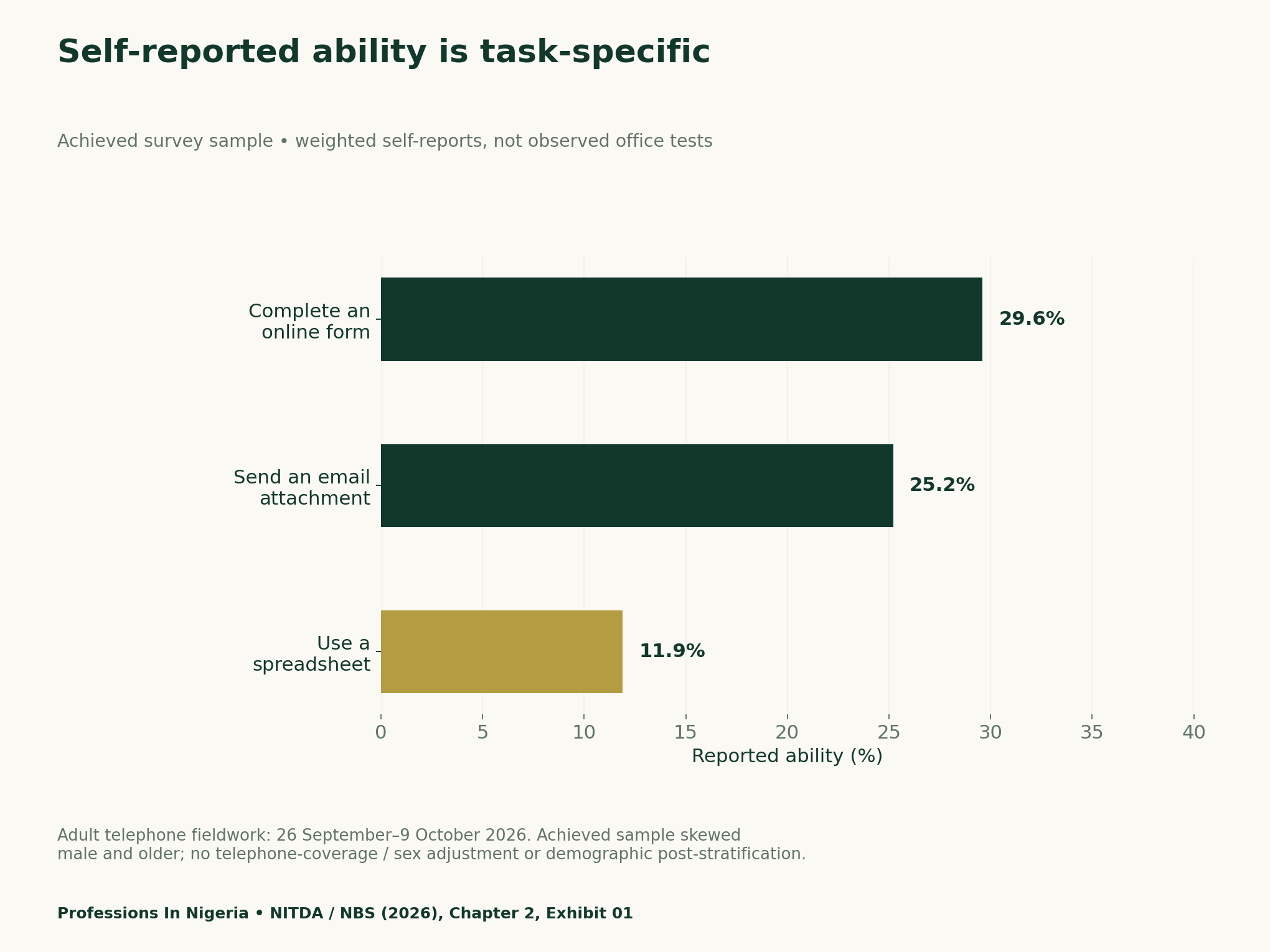
The report separately puts ability to perform at least one of eight tasks at 77.5%. That is not a workplace certification or an unrestricted digital-literacy rate. Annex A discloses an older, predominantly male achieved sample, no telephone-coverage or sex adjustment, and no demographic post-stratification. State estimates are unsupported.
Replace a broad label with an acceptance criterion
A useful task states what success looks like before you begin. “Use email” is vague. “Attach the current practice file to an unsent draft and verify its filename” describes an observable output. You can check the result without sending anything or handling real workplace information.
Keep the criterion narrow enough to inspect. Record the file version, expected identifier or calculation rule. Do not change the standard after seeing the result merely to make the exercise look successful. If a task depends on software you cannot access, record that barrier separately.
The aim is focused practice. An error in a filename may need a different activity from an error in a formula. A missing connection needs an access solution. Combining all three into one score would hide the practical reason the task did not finish. Our AI workplace verification guide applies a related output-checking principle to draft delivery.
Try the six-task fictional office diagnostic
| Task | Output to check |
|---|---|
| Locate the current file | Identify the file explicitly marked v2; preserve an original copy |
| Attach the correct file | Use an offline mock or unsent draft; attach v2 and inspect its filename |
| Enter a record | Copy EX-002 into a new practice row without changing the ID |
| Calculate known amounts | Check 2×1000 and 1×500, then their subtotal |
| Identify a missing value | Distinguish EX-003 blank quantity from EX-004 zero quantity |
| Explain a sharing choice | Describe how to check the recipient and scope without sending |
Download the practice records and keep the original unchanged. Work in a separate local copy. The supplier names, amounts and identifiers are invented. The teaching amounts are not prices, invoices or claims about an actual Nigerian business.
For the attachment task, use a mock interface or an unsent draft. Inspect the selected filename and stop before sending. For the record-entry task, preserve EX-002 exactly and avoid leaving a duplicate in the final working table. This tests a defined output, not general intelligence or employability.
A blank and a zero answer different questions
The fictional file includes one blank quantity and a separate quantity of zero. The blank remains unresolved. The zero supports a zero line total for that record. Replacing the blank with zero would make the table look complete while changing its meaning.
The two known positive line totals are 2 × 1,000 = 2,000 and 1 × 500 = 500. Their subtotal is 2,500 teaching naira. It is not the complete grand total because another quantity remains unknown. Retain that qualification next to any calculated amount.
If you use a spreadsheet, inspect the underlying cells and formula rather than only the displayed total. A polished result can still omit a row or use a value from an old version. The answer key makes those checks explicit without requiring private data.
Separate confidence, performance and access
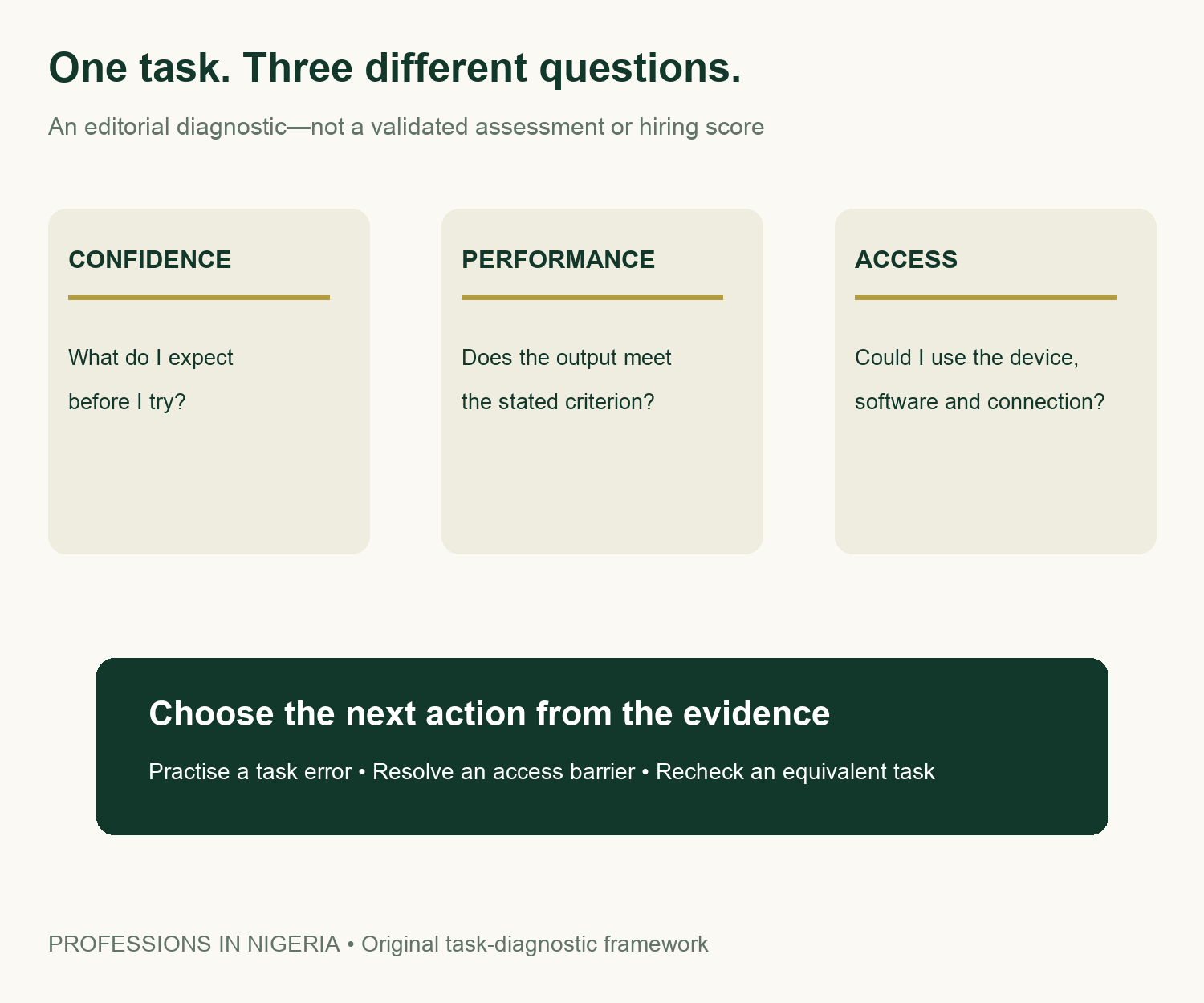
Before trying a task, optionally record confidence on a simple one-to-five scale. This is your own reflection, not a validated psychological measure. Afterward, record what happened against the acceptance criterion. Keep those two observations in separate columns.
Use clear outcome labels: independent completion, completion with a hint, unresolved error or not attempted. Add an access-barrier note separately. If the software was unavailable, do not silently call the person unable to perform the task. Likewise, confidence alone should not be entered as successful completion.
A hint can be useful learning evidence. Record what the hint supplied so you know what still needs practice. For example, being shown where attachments are stored is different from being shown how to check whether the attached version is current. Do not erase that distinction with a single pass mark.
Choose a practice activity and repeat an equivalent task
Write one specific next action for each unresolved issue. You might practise identifying version labels, checking copied identifiers or tracing a formula to its source cells. Avoid an automatic course recommendation. First connect the proposed activity to the error you actually observed.
For a recheck, change the fictional record or filename while keeping the task and acceptance criterion equivalent. Repeating an answer from memory does not demonstrate the same thing as completing a fresh example. Record the date, any hint and the resulting output.
Keep the exercise proportionate. It can help explain a practice need in a learning conversation, but it cannot establish readiness for every office role. A real position may involve different systems, responsibilities, accessibility needs and supervision. Ask about those actual duties rather than treating this worksheet as an employer’s standard.
Download the data, fictional records and task tools
- Reported task values with dates and source metadata (CSV)
- Fictional office practice records, version 2 (CSV)
- Six-task criteria and answer key (CSV)
- Blank confidence, outcome, access and practice log (CSV)
All performance fields are blank because no assessment has been run. Keep any completed personal log private. Do not add customer records, employee identifiers, passwords or confidential files to make the exercise feel realistic. Explore more source-linked tools in Research & Reports.
Methodology and limits
We checked Chapter 2 and Annex A of the original report, retaining the task definitions and sampling qualifications. The source chart uses only three selected weighted self-reports. We do not subtract their shares to infer combinations of skills or multiply them by the interview total to invent respondent counts.
The diagnostic, fictional records, answer key and three-part infographic are original editorial tools. We verified the teaching arithmetic, but did not test participants or validate a scoring system. One substantive source chart is sufficient here: extra statistical graphics would imply performance findings that do not exist. The tools do not predict hiring, salary or course returns.


