




Digital teaching skills in Nigeria need more than a training attendance figure. A teacher may complete a course yet still need to demonstrate how a lesson works on a shared device, how an assessment includes different learners and how pupil information stays private. The practical question is what evidence to show after training.
Checked October 26, 2026. UNICEF’s October 22 release reports more than 19,000 teachers trained in digital literacy through a partnership with Airtel Africa and Nigeria’s government. We separate its qualified programme metrics from professional competence, then propose a four-piece portfolio and a blank review worksheet. We have not tested this portfolio in classrooms or measured its employment effects.
Digital teaching skills Nigeria: read the reported measures carefully
The UNICEF release carries an October 22 publication date and an October 21 Lagos/Abuja dateline. Its figures describe cumulative partnership activity, not teachers trained during that news week. The four measures below use different units and retain the source’s qualifiers.
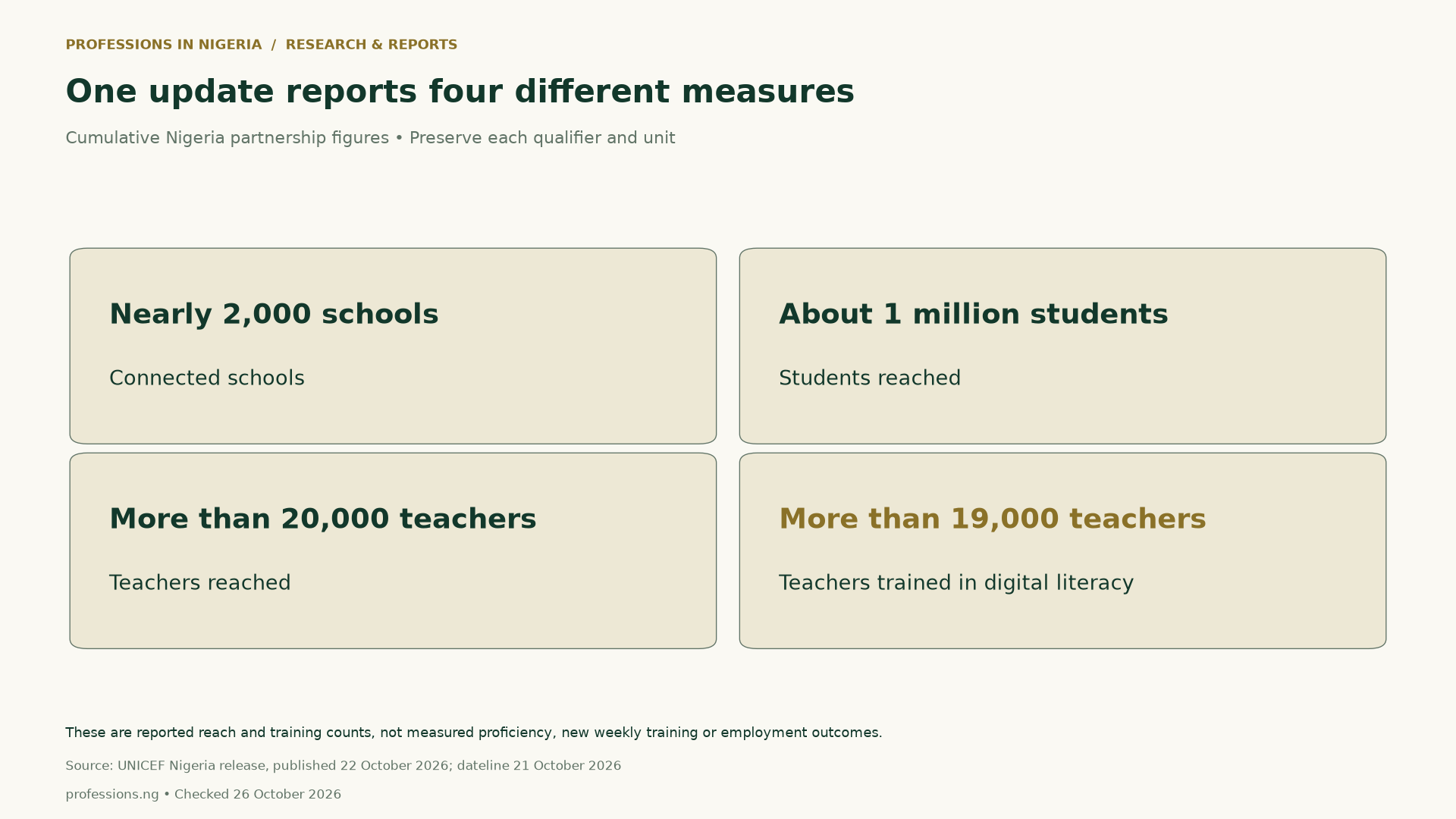
| Reported measure | Value and qualifier | What it describes |
|---|---|---|
| Schools connected | Nearly 2,000 | School connectivity |
| Students reached | About 1 million | Student reach |
| Teachers reached | More than 20,000 | Teacher reach |
| Teachers trained in digital literacy | More than 19,000 | Training participation |
The release also gives Nigeria Learning Passport registrations. Those belong to a separate platform population; they are not the partnership’s training cohort. Keep them in a different section of the downloadable source table. Do not add registered users to people reached or assume that every registration represents active use.
Why 19,000 divided by 20,000 is not a measured training rate
Both teacher figures are lower bounds. Dividing their displayed reference values produces 95%, but that does not identify the actual ratio. The unknown reached total and unknown trained total could be different amounts above their stated bounds. Even when training is a subset of reach, two lower bounds do not supply the exact numerator and denominator.
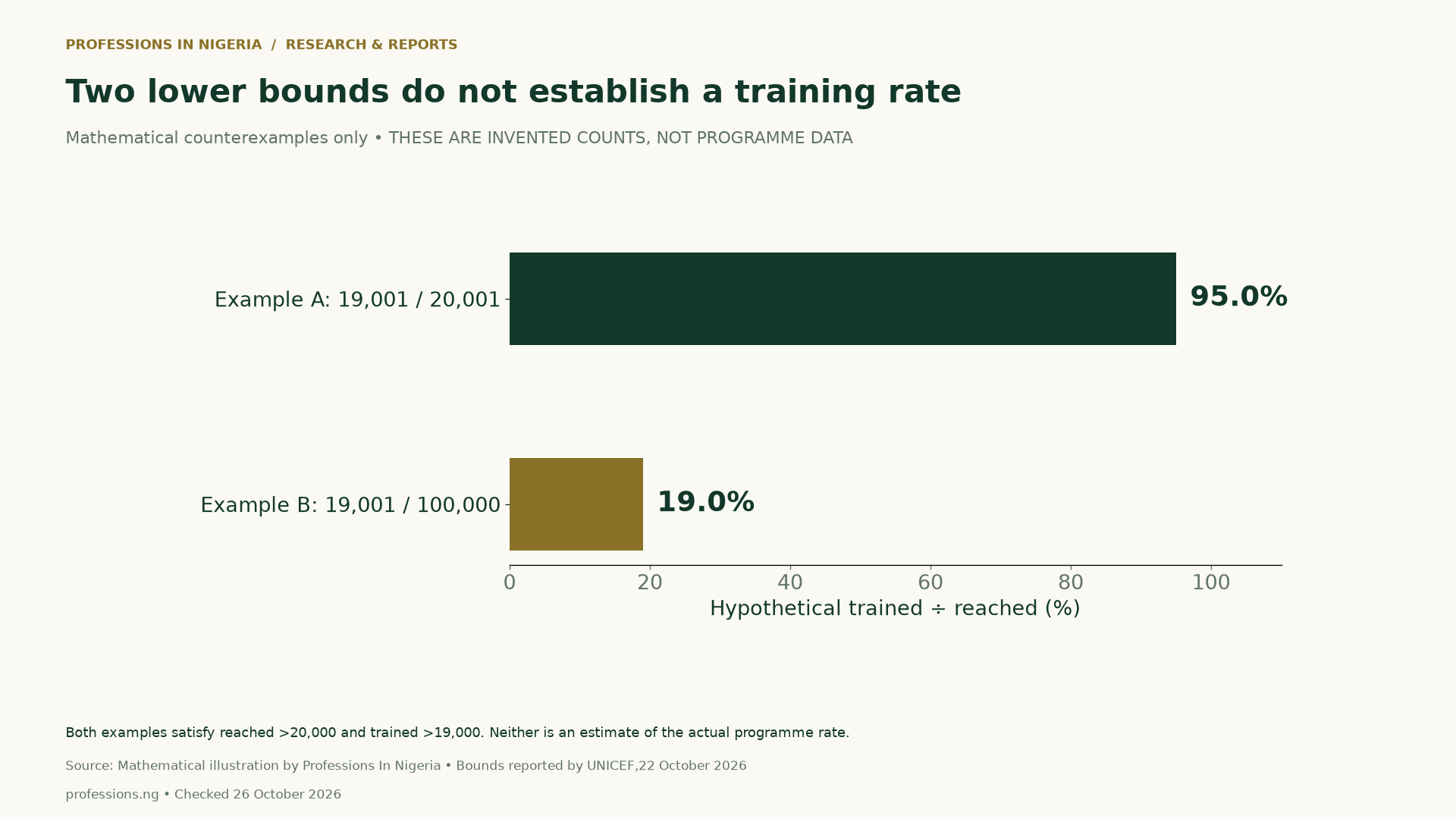
Similarly, dividing approximate student or school figures would create false precision. A per-school average would also hide differences in school size and coverage. We therefore publish no training-conversion rate, students-per-school average or count of teachers who failed to complete training. The source does not provide the information needed for those claims.
Access, participation and classroom evidence answer different questions
First, access asks whether a teacher or learner can reach the material with the devices and connectivity available. Next, participation asks who joined a programme or training activity. Demonstrated ability asks what a teacher can plan, explain, adapt and revise. Learning outcomes require further evidence about learners and an appropriate evaluation design.
UNICEF’s Superstar Teacher Toolbox offers background on purposeful digital pedagogy, including learning objectives and assessment. The Accessible Digital Learning Portal, developed by UNICEF, provides resources for inclusive content in different resource settings. These resources inform our questions; they do not endorse our portfolio rubric.
For example, a teacher might design a technically polished slideshow that pupils cannot open at home. Another might create a small, printable lesson with a clear objective and an accessible way to respond. The portfolio should explain these design choices rather than imply that more software features automatically mean better teaching.
Four work samples for digital teaching skills in Nigeria

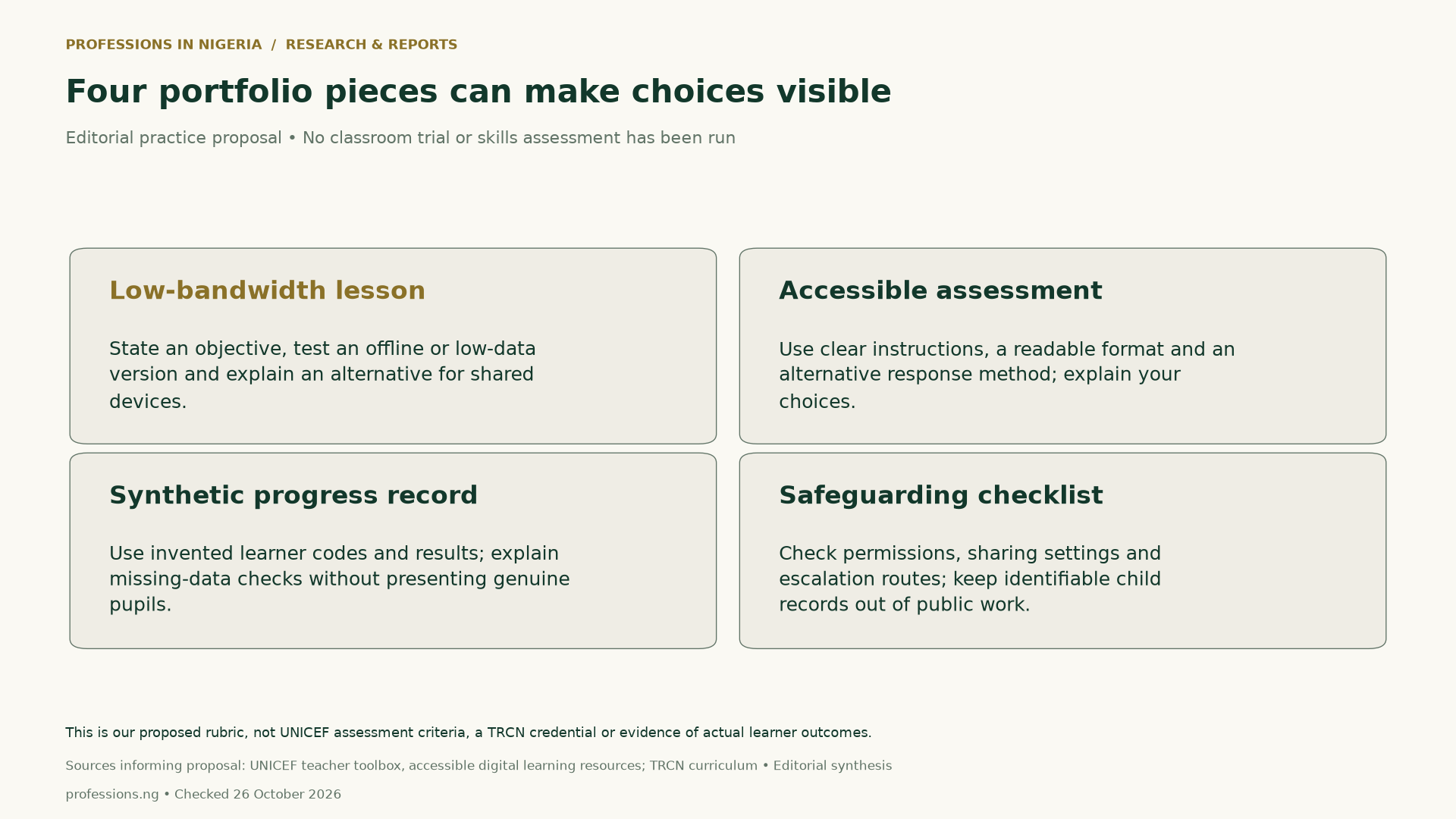
1. A low-bandwidth lesson with a clear fallback
Choose one narrow learning objective. For instance, an invented planning exercise could ask learners to compare simple fractions using a short page of diagrams. Prepare a version that does not depend on streaming video, then explain an offline or shared-device alternative. State the intended age or class level and the materials needed.
Record the constraints you assumed, such as screen size or intermittent connectivity. Next, document how you would test file access and instruction clarity. A download test establishes file access in that test setting; it does not establish a learning gain. If you have not tried the lesson with learners, say so and keep the outcomes field blank.
2. An accessible assessment with more than one response route
Design a short check aligned with the same learning objective. Use readable text and clear instructions, and explain an appropriate alternative response route, such as a spoken explanation or a paper response. Choose alternatives for the learning goal and actual learner needs rather than treating one format as universally accessible.
The UNESCO–UNICEF–ITU charter identifies inclusion, pedagogy and trustworthiness among principles for public digital learning platforms. These are useful background questions for design. They do not certify a particular worksheet or replace school policies and specialist accessibility advice.
3. A synthetic progress-tracking exercise
Use invented learner codes, invented marks and a clear label that every record is synthetic. Demonstrate how you would notice a missing value, preserve the original entry and explain a correction. Keep absence distinct from a zero result. State what a column measures rather than letting a spreadsheet colour imply a judgement about a child.
This exercise can show record-handling choices without exposing real pupils. It cannot establish classroom performance because the data are invented. Never relabel a synthetic demonstration as a successful school intervention. If later work uses authorised real evidence, follow the school’s privacy and safeguarding processes before collecting, retaining or sharing it.
4. An online-safeguarding and sharing checklist
Before sharing a lesson or portfolio, check who can view it, whether links expose personal information and which school-approved route handles a concern. Use sample or licensed materials. Avoid pupil names, photographs, identifiers, contact details and genuine individual results in a public portfolio. Do not upload a classroom register merely to make the sample look realistic.
Explain the decision behind each check and record what remains unresolved. An example checklist is not proof that a platform, school or teacher complies with every applicable rule. The useful evidence is a clear account of choices, permissions and review, with limits stated openly.
Digital teaching skills in Nigeria: qualifications remain separate
A digital course or portfolio does not replace teaching qualifications or professional registration. The TRCN registration guidance provides the relevant official starting point. Follow the route that matches your actual qualifications, including the council’s guidance for foreign-trained teachers where relevant. We do not determine an individual applicant’s eligibility.
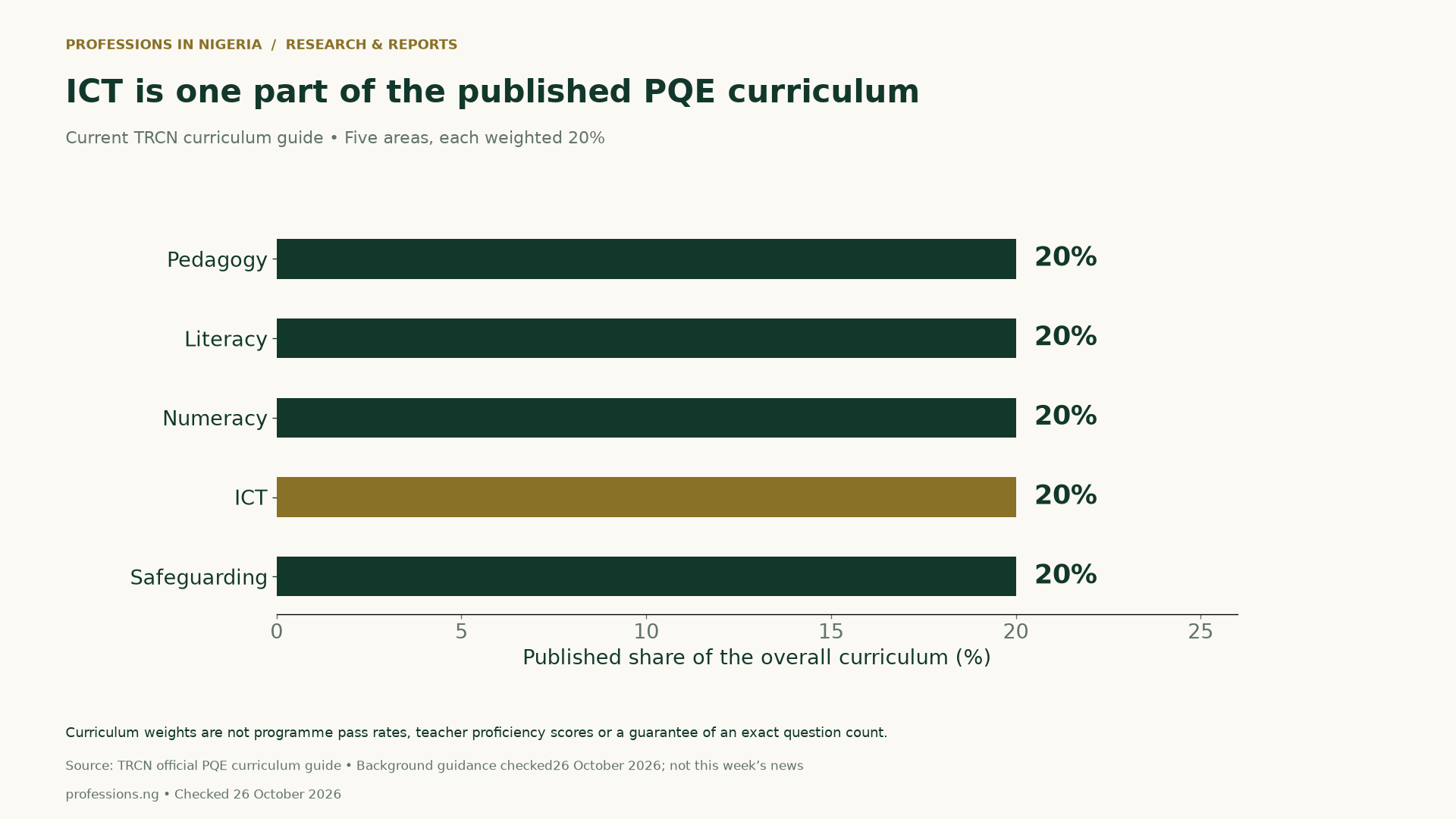
The current PQE curriculum guide lists five equally weighted areas. ICT is one of them, alongside pedagogy, literacy, numeracy and safeguarding. A chart of these weights explains the published curriculum structure. It does not show how well programme participants performed or guarantee an exact question count for an examination.
Building digital teaching skills in Nigeria: compare course evidence
Ask a provider what participants practise, who reviews the work and how feedback leads to revision. Check accessibility, device and data requirements before enrolling. Also ask what the certificate actually records: attendance, completion, an assessed task or another defined outcome. Treat vague promises about guaranteed jobs or salary gains as claims requiring separate evidence.
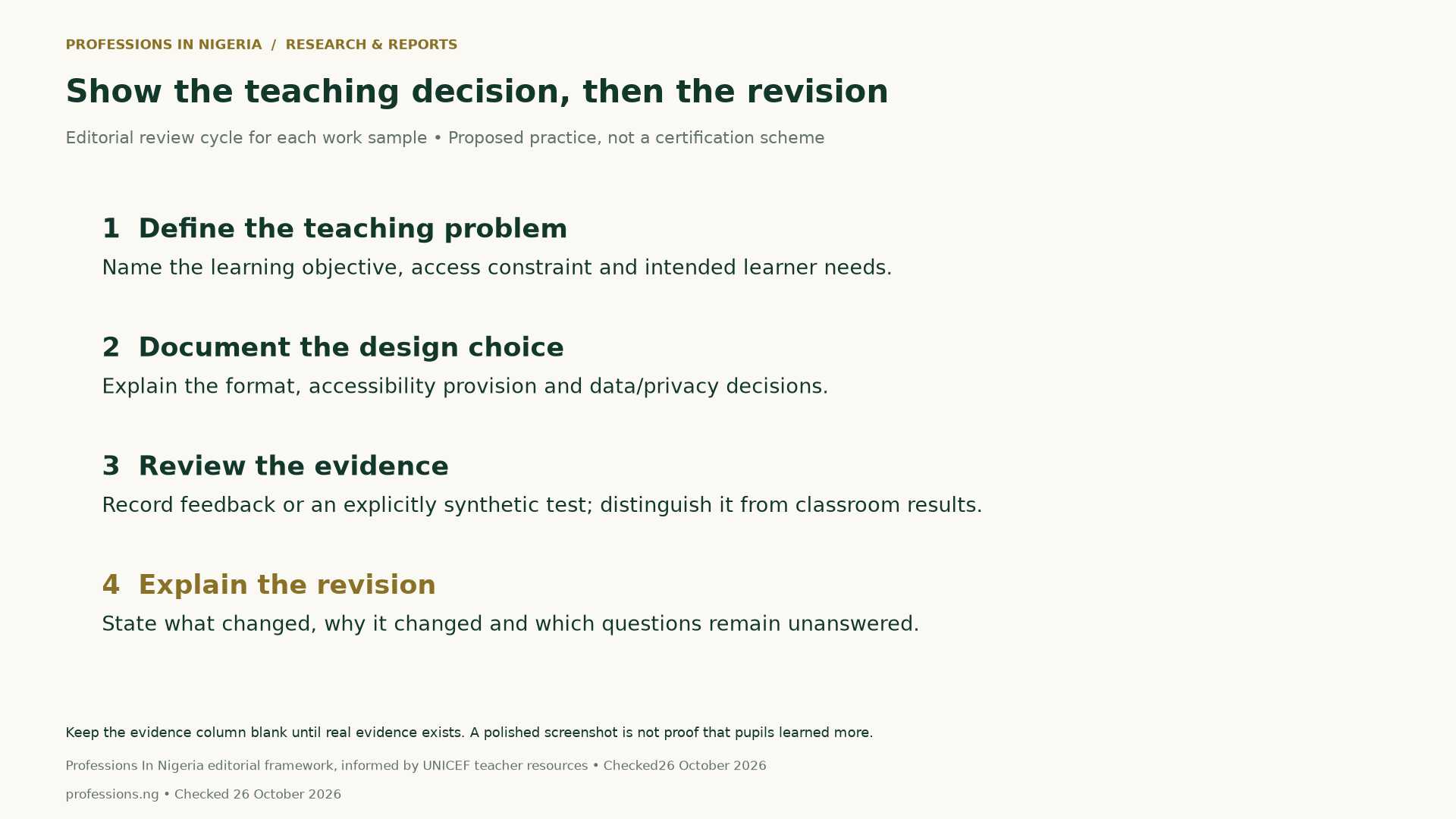
For each portfolio piece, describe the teaching problem, design choice, accessibility provision and reason for revision. Our blank worksheet includes an evidence reference and unresolved-question field. Leave those blank until you can document them. A reviewer can then understand the reasoning behind a sample instead of judging it solely by visual polish.
Our EdTech careers overview gives wider sector context. This report serves a different practical need: helping teachers evaluate training claims and document professional development. Browse our Education coverage for related pathways, while checking current requirements with the relevant authority.
Digital teaching skills in Nigeria: methods and downloads
We transcribed six qualified measures from the UNICEF release, keeping the four partnership measures separate from two Learning Passport registration measures. The CSV preserves unit, qualifier, population, publication date and dateline. We calculated no programme completion rate. The two invented ratios are mathematical counterexamples only, with no claim about the true totals.
We checked TRCN’s current curriculum and registration pages as background and used UNICEF teacher resources and the public-platform charter to inform editorial questions. No classroom experiment, learner assessment, teacher assessment or hiring study has been run for this report. The proposed rubric therefore remains a transparent practice framework rather than an evaluated intervention.
Download the digital teaching metric definitions (CSV) and blank digital teaching portfolio worksheet (CSV). The worksheet contains four editorial prompts and blank evidence columns. Do not insert identifiable pupil information into a version intended for public sharing.
Suggested citation: Professions In Nigeria, “Digital Teaching Skills in Nigeria: What ‘19,000 Teachers Trained’ Really Measures,” checked October 26, 2026. Cite UNICEF for its reported programme figures, TRCN for the curriculum and Professions In Nigeria for the explanatory comparison and proposed rubric. Preserve all qualifiers and limitations.


